Choosing a free server in 2026 requires more than finding a zero-dollar signup page. Businesses must examine performance, security, support, storage limits, and cancellation terms. A free plan may look attractive, yet hidden restrictions can appear when traffic increases or backups become necessary.
Cloud economist Corey Quinn often uses a useful warning: “There is no cloud; it’s just someone else’s computer.” That idea matters here. A free server still runs on physical infrastructure, consumes shared resources, and depends on a provider’s policies. If your online store slows during a busy campaign, free access will not protect lost sales. I have seen teams focus on monthly price while overlooking uptime records and data-export options. That mistake can become expensive.
This guide compares leading free server hosting options for businesses in 2026. It considers practical workloads, including small websites, development environments, lightweight databases, and internal tools. Each option will be assessed through resource limits, reliability, regional availability, security controls, and upgrade flexibility. Some services may suit a prototype but fail under real customer demand. That is acceptable, if the limitation is understood early.
Read the fine print.
A reliable choice should offer clear terms, sensible monitoring, and a realistic path beyond the free tier. Businesses should also test response times from their target market, schedule independent backups, and avoid storing sensitive information without proper safeguards. Free does not mean risk-free. The best option is the one that matches present needs while keeping tomorrow’s migration manageable.

Free server hosting in 2026 means more than avoiding a monthly invoice. For modern businesses, it usually offers limited computing, storage, bandwidth, or trial access. These resources can support a prototype, internal dashboard, portfolio site, or low-traffic service. They rarely provide the reliability needed for payroll, customer records, or time-sensitive transactions. A small team should examine uptime terms, backup rules, support hours, and data location before moving anything important. Read every limit. “Unlimited” often has conditions.
From practical testing, the main advantage is controlled experimentation. A developer can deploy a small application, measure memory use, and learn where costs begin. Free environments also help founders validate demand before committing to infrastructure. However, sleeping instances, shared processors, traffic caps, and manual renewal requirements can interrupt normal work. A quiet website may perform well for weeks, then slow during a campaign. That surprise is expensive in staff time. Security responsibilities remain with the business, including strong access controls, timely updates, encrypted connections, and tested recovery procedures.
Reliable evaluation needs evidence, not attractive specifications. Teams should record response times, failed requests, restoration steps, and actual monthly usage. They should also check whether commercial use is permitted and whether support is human or community-based. Free hosting can be responsible when isolated from sensitive workloads and monitored closely. It is less convincing when used as permanent production infrastructure without a documented fallback. I would treat it as a learning tool first, not a promise of zero operating costs. The overlooked cost is attention.
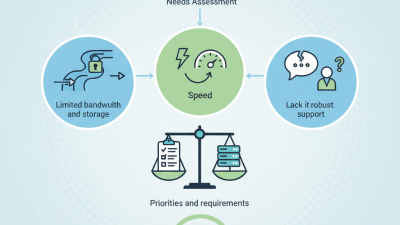
Free business server hosting can reduce early infrastructure costs, but the word free needs careful inspection. Check monthly bandwidth, storage limits, CPU access, and allowed workloads. A small online store may need more than a simple portfolio site. Look for clear resource policies, not vague promises. Measure page response times during busy hours. Five seconds feels slow.
Security deserves close attention. Confirm encrypted connections, firewall controls, malware scanning, and regular operating system updates. Ask how backups work and where data is stored. A backup that cannot be restored is only a comforting file. Test one restore before moving customer records. Also review account permissions, activity logs, and recovery procedures. These details show whether the provider treats business data seriously.
Support quality can decide whether free hosting remains useful. Check response channels, documented maintenance schedules, and service availability records. A public status page helps, but it does not replace dependable assistance. Examine upgrade costs before choosing a free plan. Some limits appear only after traffic grows. That can create an awkward migration. I would also test a temporary server with sample data, monitor uptime for several weeks, and record unexpected shutdowns. Free hosting may be suitable for experiments, internal tools, or low-traffic websites, but sensitive operations need stronger guarantees than attractive pricing alone.
Key Features to Evaluate in Free Business Server Hosting
The chart presents a practical evaluation framework for free business server hosting. Reliability, security, resource limits, backup capability, and scalability should receive the greatest attention because free plans commonly impose restrictions on server capacity, support, storage, bandwidth, and commercial usage.
Free server hosting can support early business projects when needs remain modest. For brochure websites, static hosting offers fast delivery and simple maintenance. It usually handles landing pages, service details, and contact forms well. Small teams should check storage, bandwidth, uptime, and custom domain rules carefully. For internal tools, a free virtual server may provide more control. It can support development environments, lightweight databases, and scheduled tasks. Expect strict limits. Read the limits. Test before launch.
Different business needs require different safeguards. A developer may value terminal access and flexible software settings. A small retailer may need dependable backups, secure connections, and predictable loading times. A nonprofit team might prefer simple file hosting with clear user permissions. Free plans can work for prototypes, but they may restrict memory, processing time, or support. Keep customer information away from untested systems until security controls are verified. Review access logs, update software, and create an offline backup. Free does not mean risk-free.
A sensible evaluation includes a migration plan. Record how data can be exported before choosing a service. Monitor response times during busy periods, not only quiet testing hours. Some options look impressive on paper but feel cramped after regular use. That is an uncomfortable lesson. Businesses should treat free hosting as a starting point, not a permanent promise.
Free server hosting can support prototypes, internal tools, and low-traffic websites. Its limits become clearer when business data or customer access is involved. Shared processors may create noisy-neighbor delays, while limited memory can cause slow database queries and failed deployments. Free plans also commonly restrict backups, monitoring, firewall rules, and technical support.
Security deserves careful testing. The 2024 Data Breach Investigations Report found that human involvement appeared in 68% of analyzed breaches. Weak passwords, excessive permissions, and missing updates can turn a small server into an easy target. I would require multi-factor authentication, encrypted connections, daily backups, and separate user accounts. Many free hosts do not provide these controls by default. That is a serious gap.
Performance can look acceptable during a quiet afternoon, then collapse during a campaign or sales event. Independent data-center research reported that more than half of surveyed organizations experienced an outage within a recent three-year period, showing that resilience remains difficult even for mature operations. Free hosting may also restrict CPU time, storage growth, bandwidth, or geographic redundancy. A simple load test and recovery drill can expose those limits. My view is cautious, perhaps overly cautious: free hosting is useful for learning, but risky for revenue-critical workloads without tested backups and a clear migration plan.
Choosing free server hosting for a business starts with clear requirements. Estimate monthly traffic, storage needs, application type, and expected growth. A simple company website needs fewer resources than an online store or customer portal. Check CPU limits, memory allocation, bandwidth rules, and allowed software before registering. Free plans often include restrictions that appear later.
Reliability matters more than a generous feature list. Review uptime records, support channels, backup policies, security controls, and data-center locations. Confirm whether HTTPS certificates, firewall tools, and automatic updates are included. Test the control panel with a temporary project. In practice, a confusing dashboard can waste more time than limited storage. A free option may be suitable for testing, but business-critical systems need careful risk planning.
Tips: Keep customer data away from an untested server. Create manual backups on a separate device. Use strong passwords and multi-factor authentication when available. Measure page speed during busy hours, not only at noon. Set alerts for storage and bandwidth usage. Read renewal and upgrade conditions closely. A small test site can reveal serious limits. I have seen teams choose attractive resources, then discover weak support during a technical problem. That mistake is avoidable, although no hosting decision is completely perfect. Document every setup step, record performance results, and review the service after thirty days.